Q. Can I clone a page in the Brandkit CMS?
Yes you can.
To save time it's often useful to be able to start a new page based on an existing page. This is where clone-able web pages comes in.
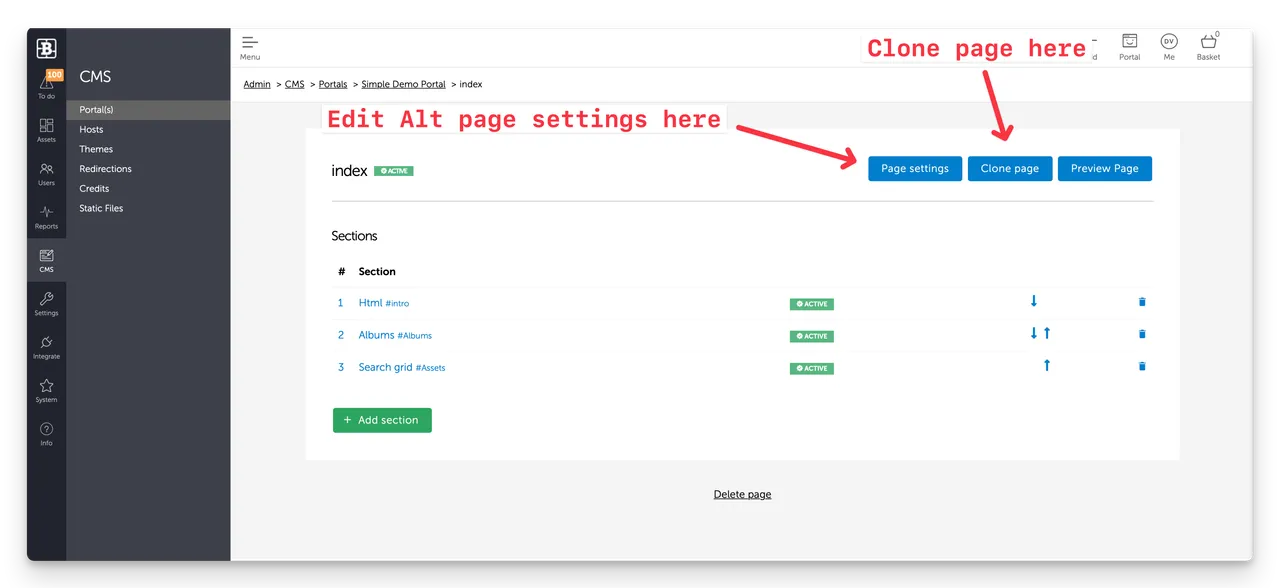 (screenshot of a CMS Web page showing the new Clone page button)
Page cloning is a new feature in Brandkit 2 added on 30th May 2024.
How page cloning works in Brandkit
It's pretty simple.
You must have an Admin or Owner User Role.
- Navigate to the Portal page you want to copy
- Click Edit page in Portal or if accessing via the CMS in Admin find the page and click Edit.
- Click the Clone Page button.
- Add a websafe (lowercase, plain text, no spaces) page name
The system then generates a replica of the original page with the new name. You can then navigate to the page and edit as usual.
There is no impact on the original page.
Enjoy :)
Q. Can I clone a page in the Brandkit CMS?
To save time it's often useful to be able to start a new page based on an existing page. This is where clone -able pages comes in...