AI powered semantic search now available in Brandkit
Brandkit now supports semantic search (Wikpedia definition) as a configurable option. It must be enabled in your Account by the Brandkit team - so contact us to enable it - for you to try it out.
You can now search for things like:
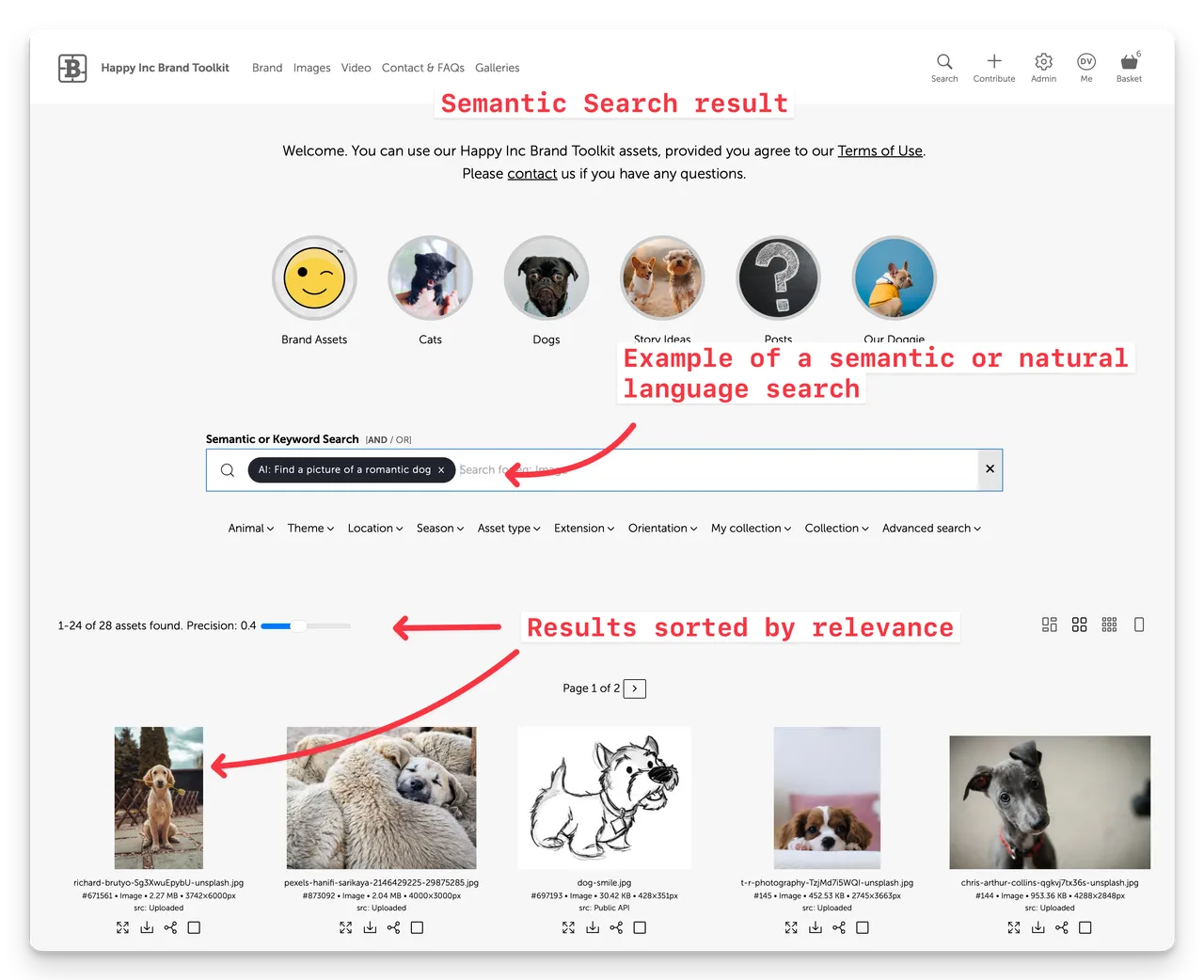
Essentially once your Assets are classified, tagged, and described, we run AI again to embed your content metadata in a vector database, which is then used to power semantic (aka natural language) searches.
Huh? Plain english please!.
What this means for users is that they can search using vague'ish natural language phrases or sentences and get sensible search results.
How it works
When you upload or create a new Asset (if Automation is enabled), a description and multiple tags will be auto-generated for you (provided you meet the requirements below).
Next Brandkit will automatically generate what is called Search Vectors. A Search Vector is a score or number generated from a combination of an Assets metadata (including asset name, description, tags and other metadata), and stored is a special Vector Database.
When entering a semantic search query, the system will convert your search query into a score and then look for Assets with the closest score in the vector database.
The search results will then be displayed with the nearest match first, followed by other assets in order of relevance (based on each asset's vector score).
So in the screenshot above we can see that the dog with the Rose between his teeth is the first Asset found - or in other words , has a score closest to the score of the search query "Find a picture of a romantic dog
Note - that in semantic search results there are no other sorting options - because semantic results are always sorted by relevance (i.e. score) to the search query (also a score). However you can set the Precision Slider to adjust the precision of semantic score matching
Single Search box
Early iterations of this feature, had users having to switch to semantic search mode - which was a bit clunky. Nicanor and the Brandkit engineering team managed to get all this working in a single search box.
Now in a single search box and we intelligently switch from meta to AI (semantic) when the meta search find nothing.
This means that entering a simple keyword or text string will trigger a type ahead suggestion - which you can select (e.g. a Tag) - or you can hit enter and run a meta search first. If the meta search returns no result - the AI (Semantic) Search will fire.
This reduces AI Token use and therefore your account usage.
We reckon that's pretty cool.
For logged in users only
Semantic Search uses AI tokens and therefore has a cost implication for customers. For this reason we limit Semantic Search functionality to logged in users only. This prevents in unregistered users or members of the public from generating token usage costs.
Public Users get all the other search methods (meta, tags, metadata attributes) by default, but once logged in automatically get access to Semantic Search capability (Provided Semantic Search is enabled in the account).
Requirements
For Semantic Search to work effectively your Assets must be properly tagged and described.
To ensure that this is done —first enable Auto Tagging and** Auto Descriptions** in your account's Automation settings for images, video and posts.
- Navigate to Admin > Settings > Automation
- Enable automatically tag with file metadata on ingestion
- Enable Automatically tag with AI on Ingestion
- Enable Automatically describe with AI on ingestion
- Ensure you have sensible (and tested) prompts setup for both tagging and descriptions.
- Repeat for Video, Posts, FAQs and Guidelines
Note: that these settings will only apply to new Assets on creation. For any existing Assets you should batch run Auto-Tag, Auto-Describe across all Assets, and once that is completed run Batch Update Search Vectors across all Assets (this will populate the search vector database used for semantic search). You may need to ask Brandkit Support for assistance.
Note also: it is important that these steps are followed in order. DO NOT run Search Vector generation if the Assets do not have completed tags, descriptions, and metadata.
Please contact us if you have any questions or to us feedback on this new feature.
Happy branding :)
AI powered semantic search now available in Brandkit
Brandkit now supports semantic search as a configurable option. What this means for users is that they can search using vague’ish phrases or sentences and get sensible search results...