


New Top Searches Report
You can now see a report of past searches, ranked by number of times that Search has been run —effectively a Top Searches report (Admins only).
This is useful in order to understand what your users are looking for, and to help make the right content investments, or fill in gaps in your content pool.
We do this by storing every search query that is made in a database table.
We can then report on these search queries, including the syntax of the search query, a count of how many times they are run, and a link to run the search to see the results in real time.
You can find the new report in Admin > Reports > Top searches.
- The report is sorted by most searched query at the top.
- There are separate counts for Portal searches vs Admin searches and a Total.
- You can filter for searches by things like Asset Type, etc.
- You can set a date range to see Searches within that period.
- You can download a CSV file.
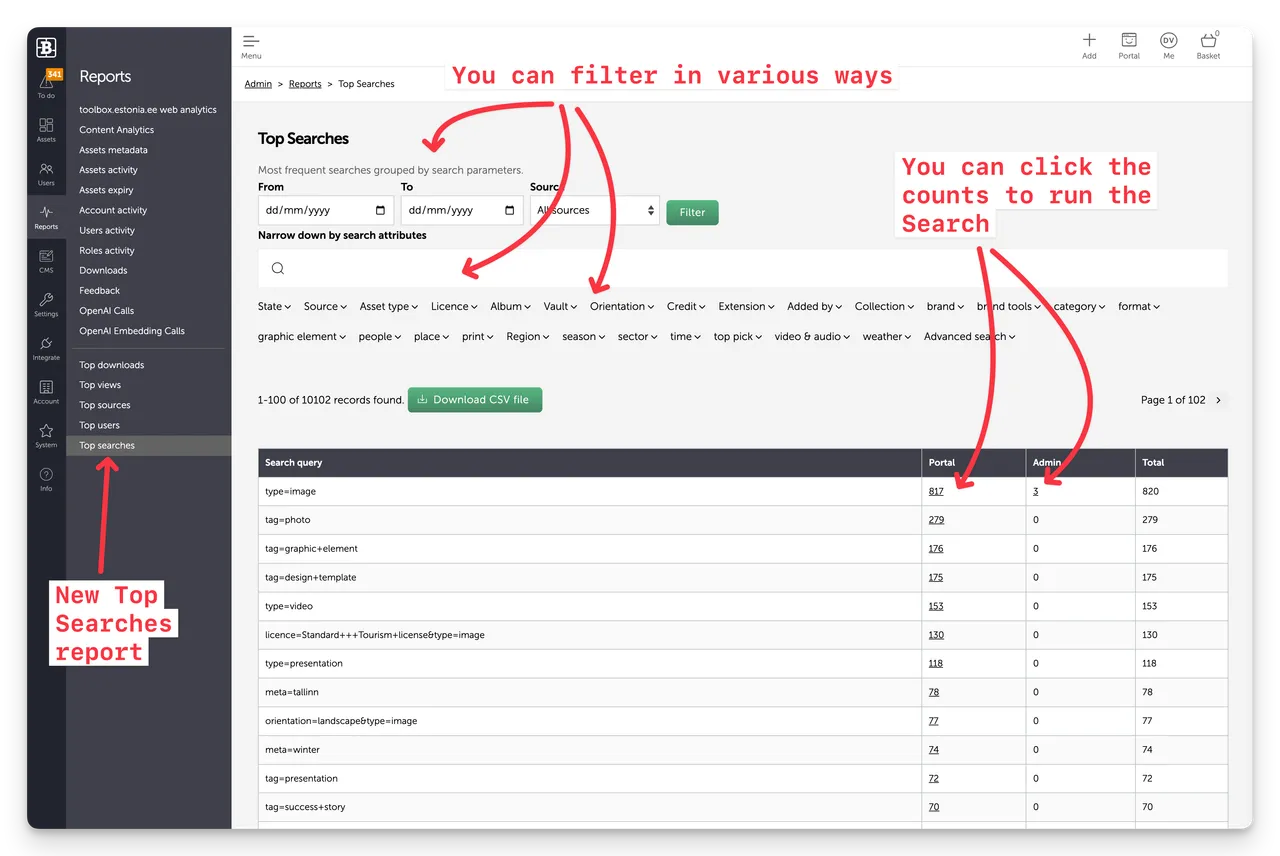
Note that not all Search Queries have been typed in the Search Box by a user. Portal Navigation links, Albums, Filters, etc generate a Search Query and these will be shown in the Report as Search Queries. Often these may appear at the top of the report.
Data collection
This report requires the collection and storage of all search queries in a new database table, and therefore only recent search history is reportable. In fact we started collecting and storing Search Query data from 29th January 2026.
We are not able to report on searches prior to that date.
Enjoy :)
New Top Searches Report
You can now see a Report of past searches, ranked by number of times that Search has been run, effectively a "Top Searches report". This is useful for Admins to understand what your users are looking for, to help make the right content investments of fill in gaps in your content pool.


