Is there a way to restrict visibility of assets for certain users/groups?
Yes, Brandkit allows you to restrict visibility of assets for specific users and groups through its advanced permission controls. This is achieved using configurable User Roles and Vaults within the platform.
- User Roles: You can define various user roles that determine the level of access each user or group has, ensuring only authorized personnel can view or manage particular assets. This flexibility allows organizations to customize permissions according to their unique operational needs, such as by office location or project teams.
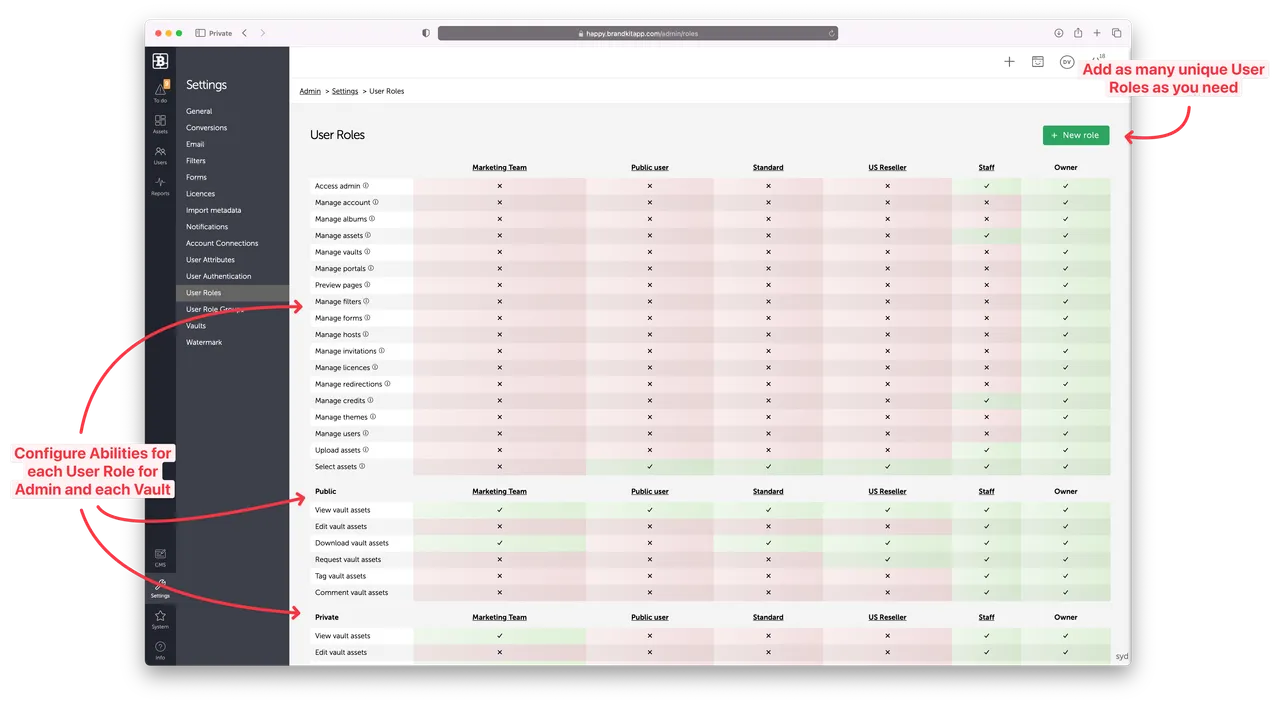
- Vaults: Brandkit's vault feature further enhances security by allowing you to segment assets into different vaults. Access to these vaults can be controlled based on user roles, ensuring that users see only those assets that are relevant to them.

- Personalization: Additionally, through the Personalization feature in the Brand Portal, you can customize user experiences and limit visibility based on specific criteria.

By leveraging these capabilities, Brandkit not only enhances security and compliance but also bolsters efficiency in asset management by ensuring users only interact with pertinent content. This ability to manage visibility supports organizations with global teams, ensuring consistency while protecting sensitive content.
Happy branding :)
Is there a way to restrict visibility of assets for certain users/groups?
This FAQ explains how Brandkit enables the restriction of asset visibility for users and groups.