How to use the AI Master Switch
The AI master switch is a feature designed to provide users with greater control over the artificial intelligence functionalities within our platform.
Here are some key points about its use:
How to Access the AI Master Switch
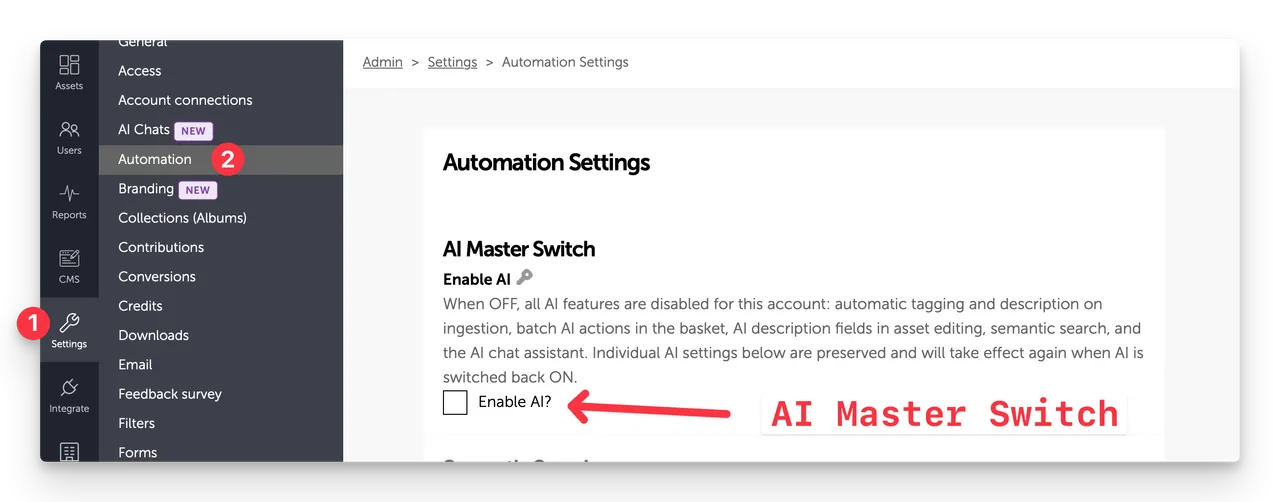
- Navigate to Admin > Settings > Automation
- Here, you will find the option to toggle the AI master switch on or off.
Functionality of the AI Master Switch
- On: When enabled (checkbox checked), the AI assistant can assist with various tasks, such as auto tagging, describing. semantic search, finding assets, answering queries, and providing recommendations based on user input.
- Off: When disabled (checkbox unchecked), all AI functionalities and work-flows will be disabled.
Benefits of Using the AI Master Switch
- Customization: Users can choose when they prefer to engage with AI or set AI workflows to run automatically - customer admins to control the experience.
- Cost Savings - all AI functionality and workflows consume AI Tokens (which we measure as Usage expressed as gigabytes (with 1m tokens = to 1GB), Disabling AI means no AI Token will be consumed.
- Manual human control: Turning the switch off can be beneficial when customers prefer full manual control, especially in sensitive situations where oversight is crucial.
Troubleshooting
If you encounter issues with the AI master switch, consider the following:
- Ensure you have the necessary permissions to access this feature.
- Refresh your dashboard if the settings do not appear to update immediately.
- Contact support if your changes are not being saved.
Conclusion
The AI master switch is a powerful tool for managing how AI interacts with your account, ensuring a balance between automation and human oversight.