
Brandkit Features
Brandkit continues to get better and better every day. For over 30 years we've continued to build industrial strength brand and digital asset managament software, that is trustworthy, capable, flexible, beautiful, easy to use, and that makes your brand and content star of the show. This page details some of the key features (and benefits) at the heart of Brandkit.
Self serve Brand Portal, Everything in one place, Visual Search Engine, Customisable Brand Portal, Links, Email tools, PDF Brand Guidelines, Digital Brand Guidelines, Embeddable Galleries, Batch Editing and Tagging, Multiple User Roles and Permissions, 3rd party Contributions, Shoppable Assets, Content Analytics and Reports, Content Attribution with Asset Credits, Asset Attachments, Content Sydication, Cross Posting, Brandkit API
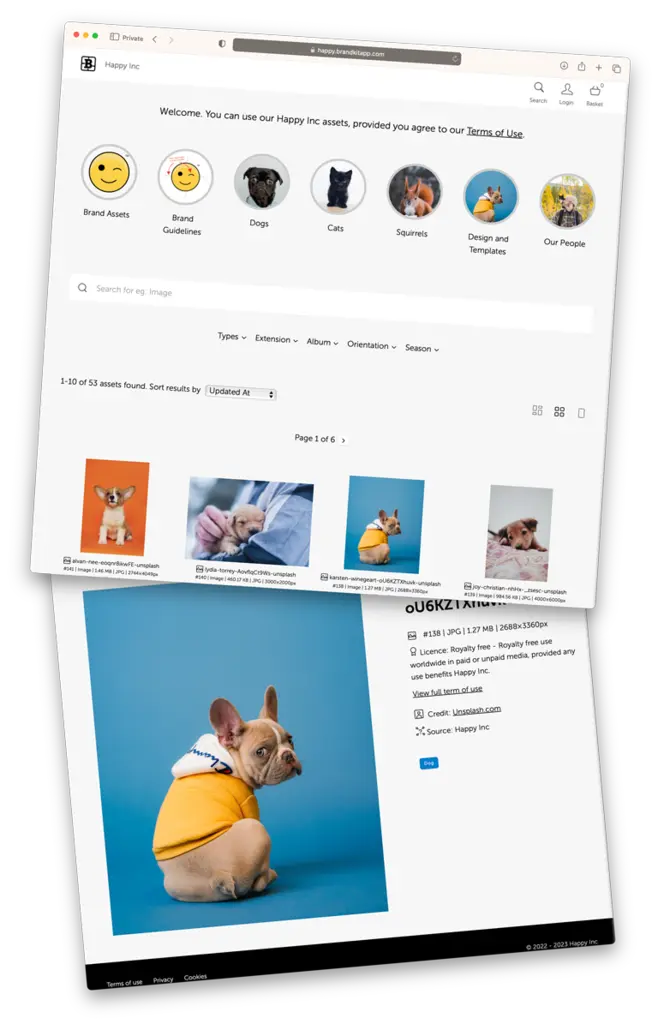
A self-serve Brand Portal
Share your brand assets and marketing resources via a customisable, brandable, private or public self-serve Brand Portal. Each Brand Portal features a powerful search engine ensuring users can always find what they need saving time for both brand/content managers, journalists and other users.

Everything in one place
One link.Your whole brand. "Digital Assets" are more than just files - Brandkit is the only Digital Asset Management software that supports ALL your brand and marketing content —including digital Files, Posts, Press Releases, external Links, YouTube videos, and brand knowledge. So that everything can be found in one place. No other DAM comes close.

A powerful visual search engine, with multi-faceted keyword, and semantic search options
All the world's your content at your fingertips. You stay in control of your metadata and tagging. With a search engine that utlizes your domain knowledge and expertise, augmented with AI (Computer Vision) powered auto-tagging an semantic search.

AI-powered industrial strength DAM
The back-end powering your digital toolkit is an industrial strength Digital Asset Management(DAM) software system.
What sets Brandkit™ apart from every other DAM is the tight integration with the built-in CMS, the combination of digital files, posts, syndicated assets, and links (to external media), in a single unified library. With everything in one place.
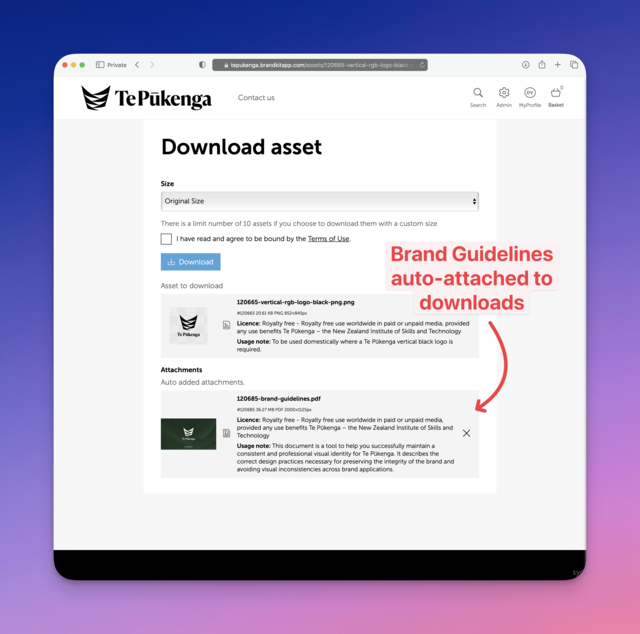
PDF Brand Guidelines with Automatic attachment
Keep everyone on brand with searchable, accessible, downloadable, Brand Guidelines —PLUS automagic attachment whenever you download logo artwork, ensuring worry free brand compliance, so you can share your brand assets with confidence.
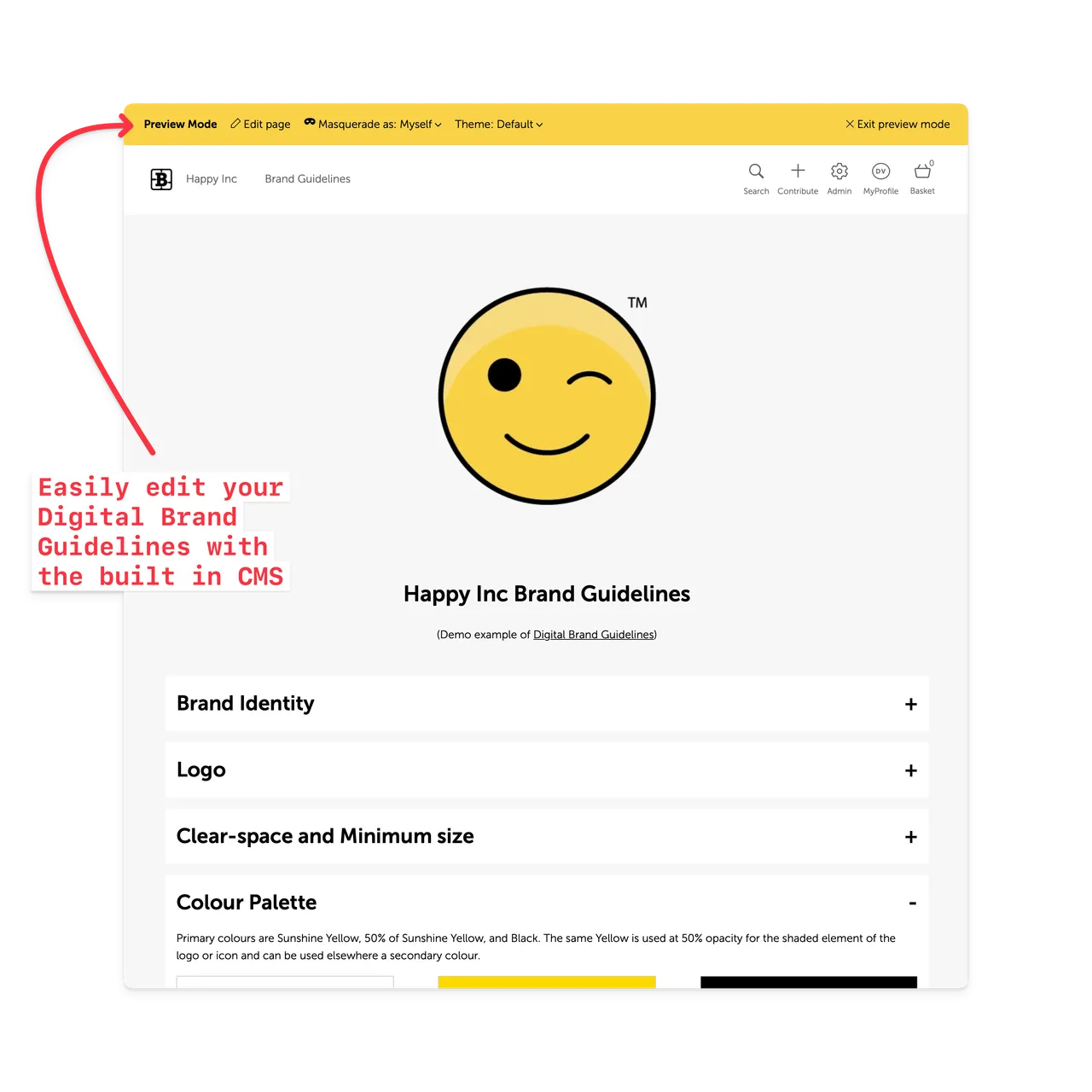
Digital Brand Guidelines with real-time editing
No more out of date, hard to read, monolithic document based Brand Guidelines. Convert your document based Brand Guidelines to digital guidelines that are editable in real-time and provide a single link/url to your Brand Guidelines - a single source of truth for your brand. No more out of date copies out in the wild.
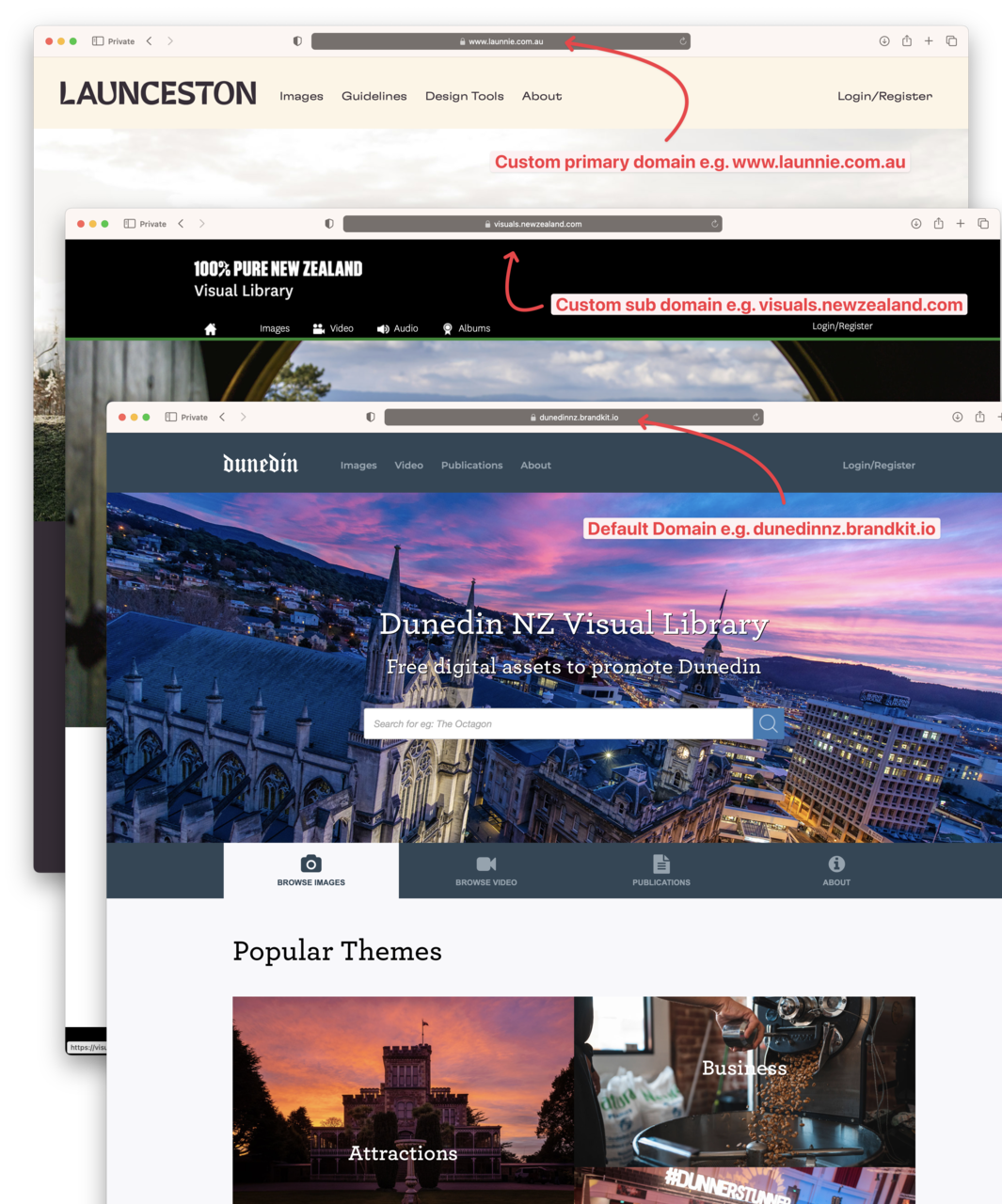
A brandable and customisable Brand Portal design and domain
Every brand is different, so we made it easy to customise your Portal with a white-glove design service, and a built-in CMS, and flexible configuration options. Your Portal can be fully customised to match your brand or campaign's look and feel, including Web domain(URL), Nav, Footers, Layouts, Fonts, Colours, Copy, custom web pages, and more.

Links - to Earned Media and more
Creating content is a lot of work, but you don't have to do it all yourself. In fact often there are other external storytellers telling your story on their own channels. Wouldn't it be great if we could surface that Earned Media in your Brandkit? Now you can!

Email Tools
Every Brandkit includes email tools to communicate with your users and subscribers including a branded HTML email template, automatic system notifications, a custom email composer, and email history in each user's audit trail.

Brand Safe™ sharing
To gain control and influence of your brand story, you have to make it easy for journalists and other users to access your official brand content.
However, first you have to wrap any access to your brand content in the right posture.
Brandkit includes Access and Rights Management controls, Brand Guidelines and other measures to ensure access to your brand assets is always Brand Safe.

Rights Management & Licencing
Use brand content with confidence because everyone knows the legal position. We answer the question: "Yay! Found it ...but wait, can I use this?" Licencing and legal stuff is tedious at best yet it's vital that your team, staff and external collaborators know when they can, can't, or how they should use your content. Brandkit® automatically displays licence and usage requirements, enabling your users to tell your brand story with confidence.

Personalisation
Serve every user like they are the only user. Brandkit supports personalisation of Brand Portal pages and the search experience in a number of ways. You can use dynamic "Mustache" variables, Login state, User Roles, Locale/Language selections and more, to deliver an entirely unique and personalised brand portal or content search experience.
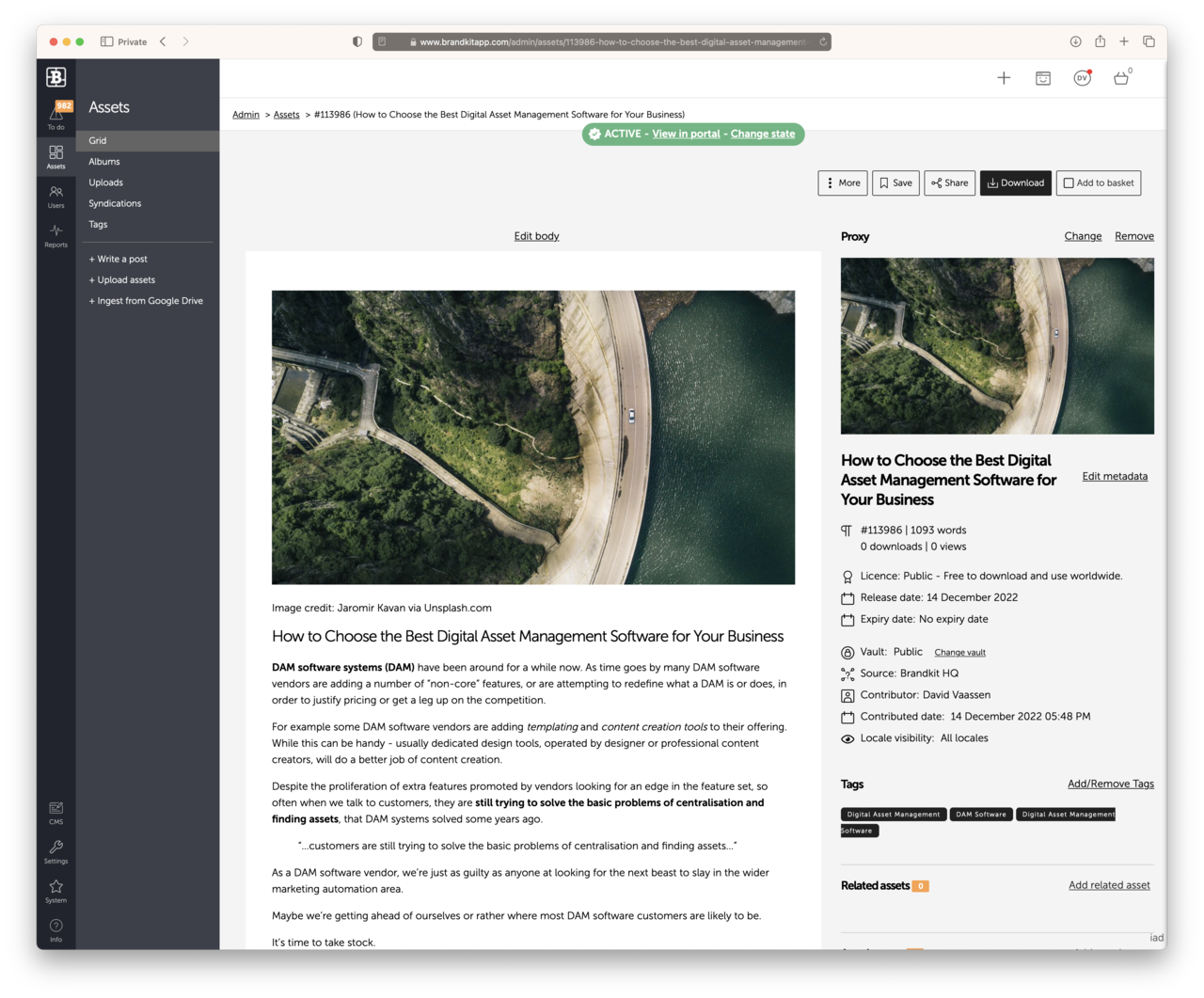
Write Blog Posts, Press Releases and more with built-in fully integrated Post Writer/Editor
Posts are a super important text-based content class in modern marketing. Posts (such as Blogs, Press Releases, Stories, Marketing Copy, Documentation) can now be written natively in Brandkit, and managed alongside uploaded files and links.
Essentially you can write a Post using a simple markdown editor. These text based Posts are stored as Assets and behave just like other Assets with tags, licensing and other Asset attributes, making universal search possible. e.g Find relevant Images Video, Press Releases, Blog Posts, PDFs, etc together in one search result. No more jumping between multiple app and sites. Awesome.
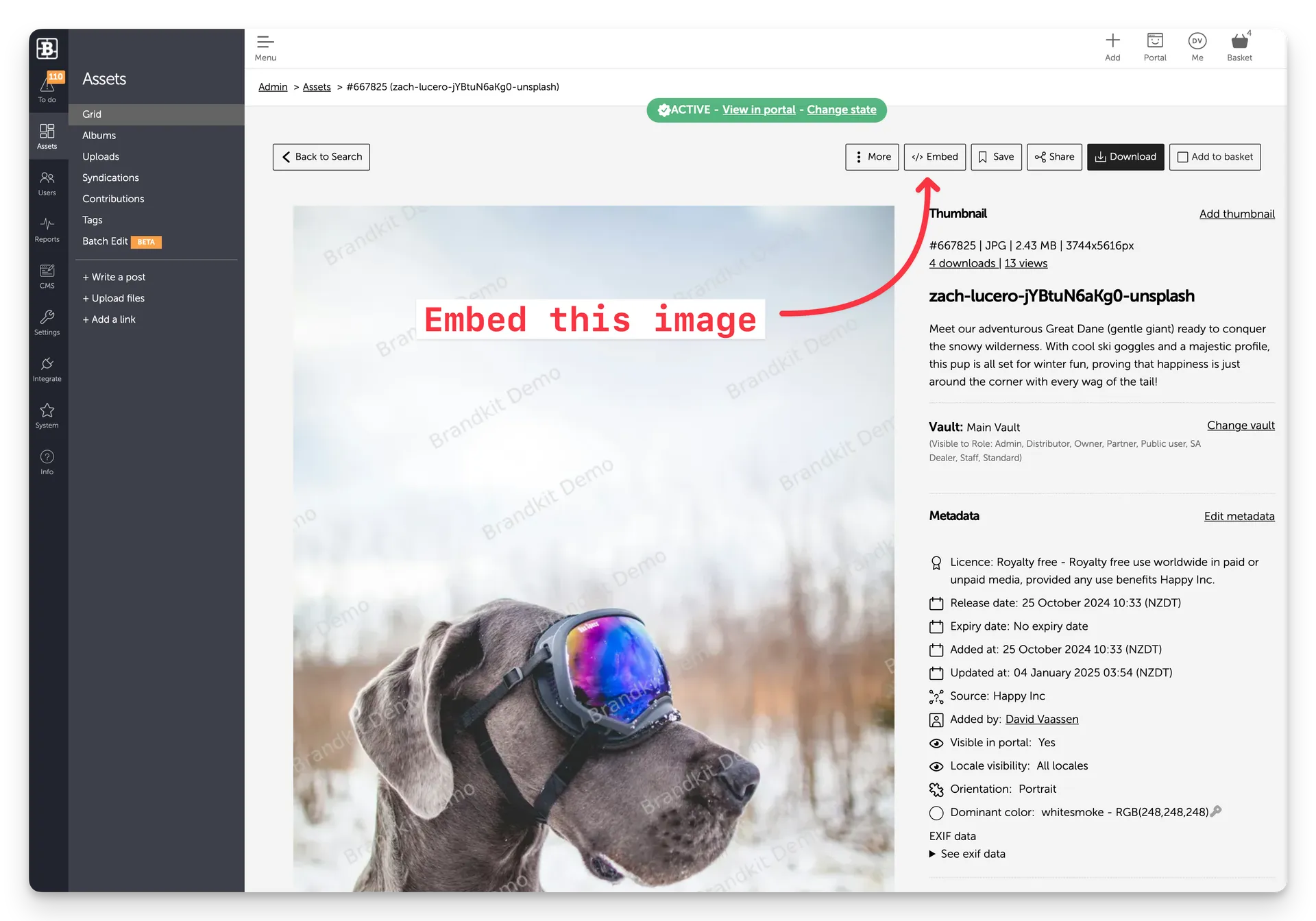
Embeddable media (with Brandkit CDN)
Brandkit provides embeddable image and video links so you can insert images (or video) in your websites, emails, cms, ecommerce and other online places, powered by Cloudfront CDN by AWS. Use image permalinks that never expire, or embed code blocks that respect versioning.

Embeddable Galleries (with Brandkit CDN)
Embed entire update-able Image Galleries that support images, video and UGC Assets. Galleries have multiple deploy and layout options. Gallery items include Asset information (like Licence and Attribution details) and even customisable links that you can customise to link to ecommerce, booking pages and more.

Batch Editing and Tagging
Batch editing and tagging of Assets is super easy in Brandkit, saving Admins oodles of time when classifying and publishing Assets. Just select the Assets you want to edit, and then access the Edit menu in the Basket. Super easy.

Multiple Users Roles and Permissions
Brandkit supports public users, unlimited registered users, more or less unlimited configurable users roles, user role groups, configurable vaults, find grained access permissions and more. Everything you need to ensure that the right people get access to the right content. Freeing up your marketing team from having to deal with repetitive time wasting content requests, while keeping your brand safe.
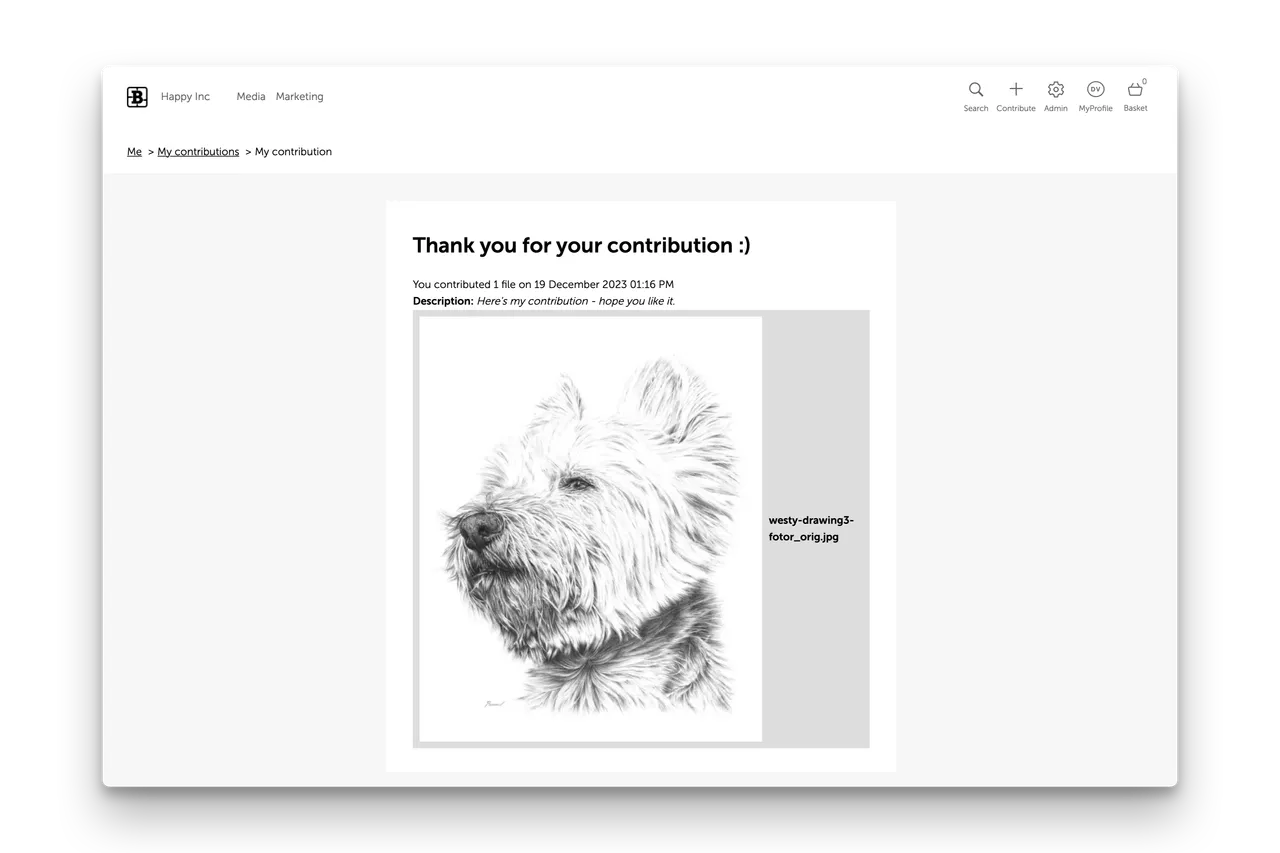
3rd party Contributions
Get more content, more easily. Allow non Admins and 3rd party collaborators to securely contribute (aka Upload) high resolution images, video and the like. Receive content from your community, stakeholders and partners. Run Photo Contests, collect UGC, enable staff uploads, and more with a customisable Upload page.

Shoppable Assets
Link your Digital Assets to your ecommerce pages to drive more business. Add a customisable link to any Asset to link to any URL. Perfect for making images, video, graphics, etc shoppable, orderable or just a call to action to go to another URL.

Content Analytics, Reporting and Insights
Brandkit includes Reports, Dashboards, Audit trails, and Insights about your digital assets, users and content usage.

Content Attribution with Asset Credits
Give Credit where credit is due - we say. Brandkit delivers content attribution on steroids. Brandkit enables the crediting of people and organisations. These might include photographers, talent, authors, vendors, or partners. We wire this up to Search, Rights Management and even a dedicated search page for each Credit. Now that's authentic.

Asset Attachments
Use the Attachments feature to automatically attach certain Assets to other Assets, at download time. For example, Attachments are perfect for automatically attaching Brand Guidelines to downloads of Brand Assets.

Content Sydication
Get free, relevant, rights managed and approved content from connected partners. And optionally, send (or push) some of your content back the other way with 2-way syndication.
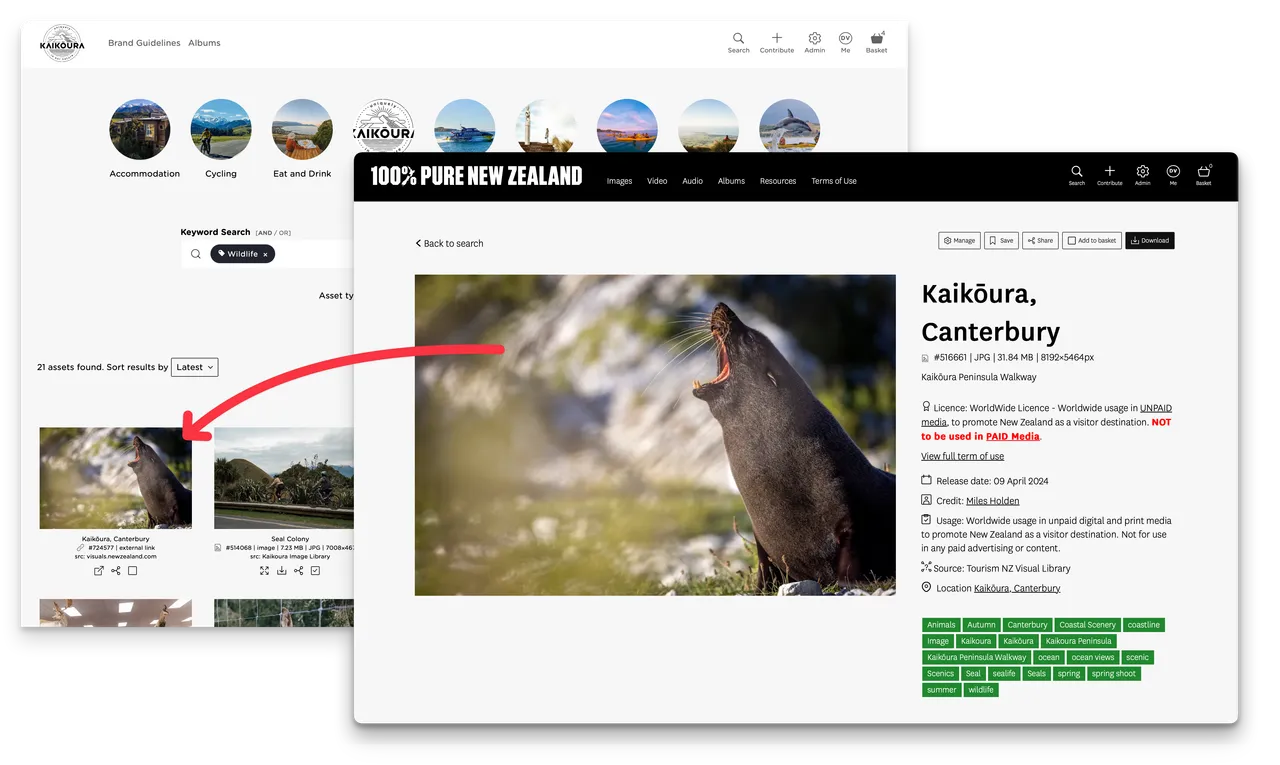
Cross Posting
Display partner content in search results in your toolkit with Cross Posting using the Links feature in Brandkit, an easier alternative to Syndication. It's a bit like Re-Posting in social media.
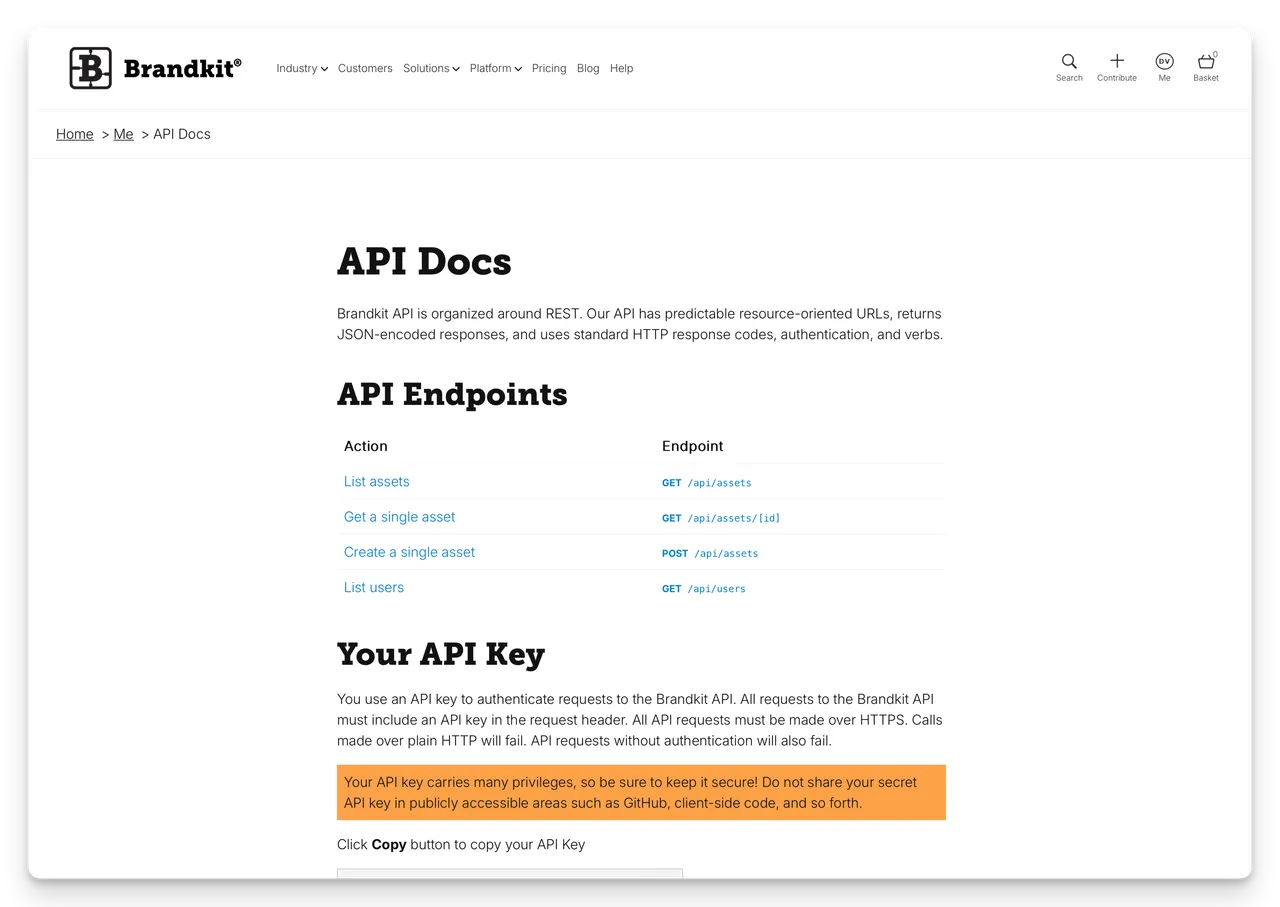
Integration via the Brandkit API
Brandkit includes a standard Application Programming Interface (API) to enable integration with a wide variety of applications.
And a few more...
- 100% Cloud (Brandkit® is 100% cloud, so working and collaborating remotely works naturally out of the box). Learn more
- 5 Ways to Share (Self-serve downloads, Asset Requests, Share workflow, Saved Collections, Syndication). Learn more
- AI Auto-tagging (AI/Computer Vision driven auto-tagging of images). Learn more
- Albums (Setup dynamic tag-based Albums that automatically fill up as you ingest more content).
- All in One Toolkit (Everything you need to find, manage, and distribute content in one place). Learn more
- Attachments (Attach any Asset to another). Learn more
- Audio (Upload audio/sound files, and get a visual thumbnail in your search results, and a playable/scrubbable audio player).
- Auto-tagging (AI/Computer Vision driven auto-tagging of images). Learn more
- Batch Editing (Edit, tag, approve, and otherwise process Assets in bulk). Learn more
- Batch Editing and Tagging (Powerful batch processing of Assets). Learn more
- Batch Upload (Upload multiple files).
- Batch Downloading (Download multiple files).
- Branded Search Page (Your own branded Search Page). Learn more
- Brand Guidelines (Manage brand assets and auto-attach brand guidelines to downloads and shares. Or create Digital Brand Guidelines in the CMS). Learn more
- Brand Management (Manage and share Brand Narrative, Brand Assets, Brand Guidelines). Learn more
- Brand-Safe™ (Wrap any access to your brand content in the right posture).
- CMS Page Widgets (Utilize several Brandkit smart widgets for dynamic asset feeds, image galleries, search grids, and more when designing your Portal pages).
- Configurable Taxonomy (Setup your own tagging taxonomy).
- Content Analytics (Reporting and insights about your content and its usage). Learn more
- Content Attribution (Credit content to authors and content owners). Learn more
- Content Management (Create and edit Brand Portal web pages and landing pages). Learn more
- Content Syndication (Integrate with other Brandkit accounts to share content). Learn more
- Conversions / Custom Download Sizes (Set up conversion presets so that users can download custom image download sizes). Learn more
- Contributions (Allow external users to safely upload and contribute content). Learn more
- CSS Themes (Use our default theme, select a prebuilt Brandkit theme, or create your own unique Theme files in CSS).
- Custom Design (Get a custom design done for you or use the CMS, create unique layouts, pages, HTML, and CSS Themes, and custom fonts).
- Data Sovereignty (We serve customers from local in-country data-centres - depending on location).
- Design Files (Upload native design files in popular formats like Adobe Illustrator, Photoshop, and InDesign).
- Digital Asset Management (Upload, manage, and share Digital Assets). Learn more
- Embeds (Embed permalink images and version-controlled images in other websites). Learn more
- Expiry Dates (Optionally set an Expiry Date for your content assets and they will be automatically set to an Expired state and removed from your Portal(s) at midnight on that date).
- Expiry Notifications (Automatic notifications to Users who have downloaded an Asset when Expiry Date is reached).
- GIFs (Upload GIF files, and get a visual thumbnail in your search results, including animation if animated).
- Global CDN (We use global CDN AWS Cloudfront for previews and embeds).
- GPS Coordinates (When you upload images with GPS coordinates, we capture this data and store it in the asset's metadata).
- HTML Code (Get direct access to Portal page code and use Mustache templating and Brandkit's smart widgets). Learn more
- Image and Video Library (Manage and share high-res photography and video). Learn more
- Images/Photography (Upload image files, and get a visual thumbnail in your search results, automatic tagging, automatic conversion presets for smaller size downloads, and embeddable image code blocks with tracking).
- Large File Transfers (Transfer large files or multiple files - WeTransfer style - at once to anyone). Learn more
- Licence Change Notifications (Automatic notifications to Users who have downloaded an Asset when the Asset Licence is changed for any reason).
- Licencing and Usage (Configurable Rights Management, Terms of Use, Licencing, Usage, Credits, and Expiry Dates for all Assets). Learn more
- Link Assets (Add, manage, and share searchable visual links to external media). Learn more
- Map Search (Search via an interactive SVG map). Learn more
- Masquerading (Masquerade as different users by Role and Locale).
- Media Asset Management (Manage and share media files). Learn more
- Multi-faceted Search (Search via tags, filters, and meta-data fields with as-you-type automatic suggestions).
- Multi-lingual (Provide your Portal in other languages - Ent Plan only). Learn more
- Multiple Portals (Serve multiple Portals from the same account - Ent Plan only). Learn more
- Multiple User Roles (Fine-grained permissions, with multiple configurable user roles). Learn more
- Mustache Templates (Optionally use Mustache templating in the CMS to use dynamic data, such as the user’s first name, in your Portal pages).
- Office Documents (Upload native Microsoft Office documents, spreadsheets, and presentations).
- Partner Stakeholder Network (Collaborate with partners - Ent Plan only). Learn more
- Passwordless Login (Login without a password). Learn more
- Personalisation (Display different content to different users). Learn more
- PDFs (Upload PDF files, and get a visual thumbnail in your search results, and fully readable PDF in your detail views).
- Post Assets (Write, manage and share Blog Posts, Press Releases, Marketing Copy, Documentation). Learn more
- Presentations (Upload presentation files, and get a visual thumbnail in your search results, and a playable/scrubbable presentation player).
- Release Dates (Optionally set a Release Date for your content assets and they will be automatically set to an Active state and made live in your Portal(s) at midnight on that date).
- Responsive Design (Works across desktop, tablet, and mobile devices). Learn more
- Search Page (Find fast with a dedicated search page for your content). Learn more
- Secure Access (We support self-registration or invite only, and provide several authentication options such as, passwordless login, email/password combo, Google ID, Microsoft ID, or Enterprise SSO).
- Self Service Portal (Users can self-serve their content needs 24x7). Learn more
- Shoppable Assets (Make Digital Assets shoppable by linking to ecommerce pages or order forms). Learn more
- Super Fast Edge Network (We use a combination of local (to you) data-centres, and the AWS Cloudfront CDN to make uploads, downloads, and requests as fast as possible).
- User Role Groups (Setup groups of User Roles in order to personalize the user experience).
- Vaults (Configurable Vaults for access control).
- Versioning (Upload new versions of Assets with history and Roll-back).
- Video (Upload video files, and get a visual thumbnail in your search results, a playable/scrubbable video player, a downloadable web optimized version, and embeddable code blocks with tracking).
- Visual Search Results (Every search result is presented as a visual grid, with a thumbnail image for every asset). Learn more
- Web Analytics (Privacy-oriented web analytics for your Brand Portal). Learn more
- YouTube integration (Aid video discovery by adding YouTube video links to your Brandkit DAM). Learn more