


What happens when an Asset expires, is it deleted automatically, or is there a warning system before this happens?
No - we don't auto Archive or Delete expired Assets.
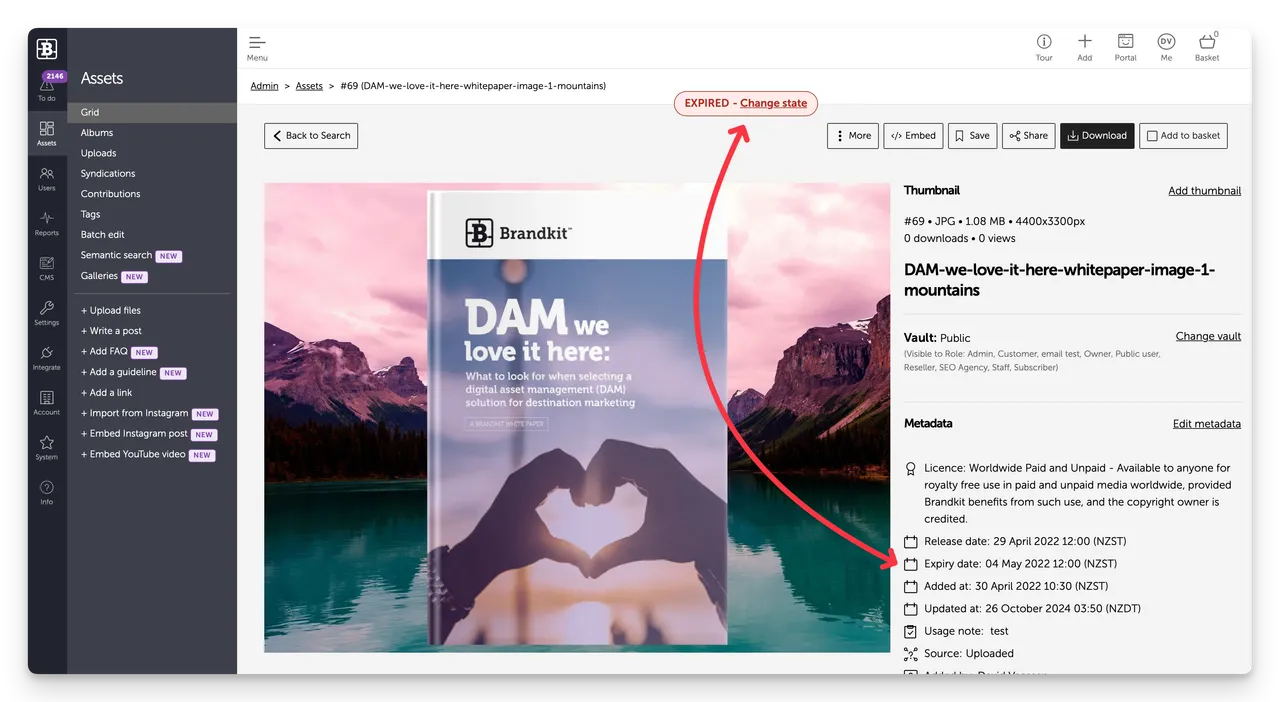
The Assets stay where it is but:
- The Assets goes into an Expired state
- It cannot appear in the Portal when in the Expired state
- You do not have to take any further action, and can just leave it in it’s Expired state forever.
- Optionally, It can be Archived or you can renegotiate any usage licence that applies, and update the Expiry Date accordingly.
- If you update the Expiry Date to a later date the Asset (provided it was previously Approved) the Asset will re-appear in the Portal.
- The Asset is not automatically Archived nor Deleted.
- You can also filter for Assets in the Expired state when search and also run reports for Expired Assets.
Automatic notifications
There is an optional automatic Notification that can be sent to Admin users X number of days (e.g. 90 days) before expiry, plus a notification to end users (who have downloaded that Asset) x days (e.g. 30 days) before expiry.
You can configure these Notification settings in:
Admin > Settings > Notifications
What happens when an Asset expires, is it deleted automatically, or is there a warning system before this happens?
What happens when an Asset reaches it's expiry date.


