
AI getting you down. Meet the new AI Master Switch
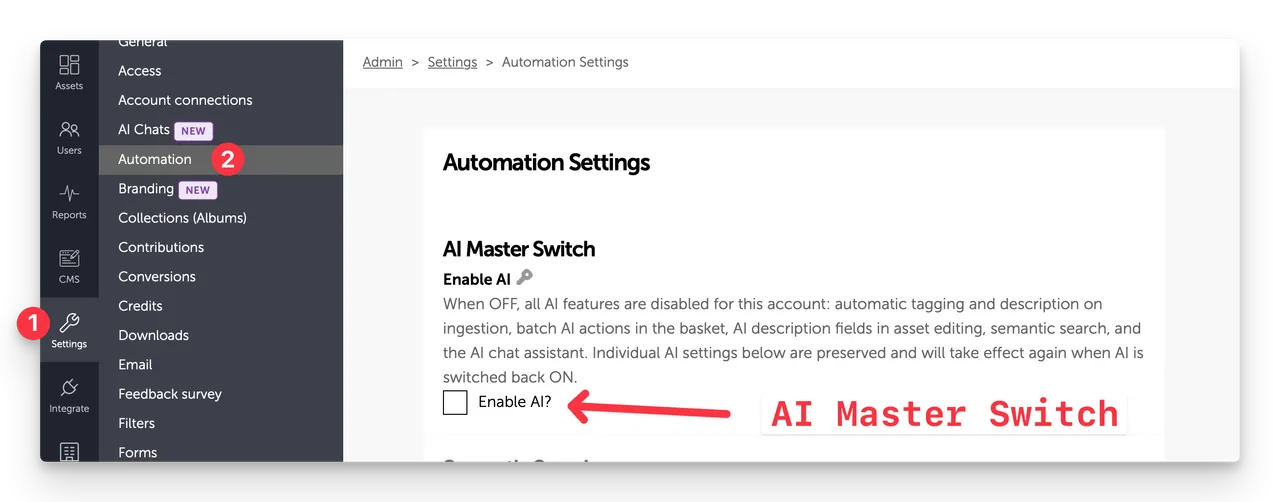
(Fig: Account with AI master switch - Enable AI - set to off (Unchecked))
We love AI as an aid to help you get your Visual Search Engine in Brandkit working with very little effort by auto-tagging, and auto-describing your assets, which we then turn into Search Vectors for semantic search.
It's an awesome time-saver - especially for often time-poor DAM librarians, content managers, marketing teams, etc.
It can be great as a writing assistant too - and I use Claude personally for research and as a writing assistant. Basically, I've replaced Google Search with Claude chat/cowork. Others use ChatGPT, Gemini, CoPilot, or a host of others.
Going further and giving AI chatbots and AI agents secure access to your assets and metadata via the MCP Protocol (a new AI-friendly API) — can greatly enhance productivity.
For example, finding an image in Brandkit, transforming it in something like Canva, and posting to Instagram - all inside a single chatbot conversation is already possible.
AI is still rapidly evolving and getting better and better - but the costs (still heavily subsidised by VC capital and debt) are climbing.
Like most tech booms/bubbles, the capability is often over-hyped, and Silicon Valley valuations are at this point unrealistic to say the least (IMHO).
It's also likely that the cost of AI tokens is going to increase significantly as the chickens come home to roost. And there is talk doing the rounds about the cost of Agentic AI being ultimately more expensive than human labour.
On top of this, there is a rising concern globally about job losses, economic collapse, and the giving up of all knowledge to a few Silicon Valley startups owned or controlled by a few US billionaires - with little or no regulation.
Then there are the open-weight, open-source self-hosted models from Chinese vendors and others, who turn the cost/price discussion on its head.
So AI is great and getting better - but with some inherent risks.
Why would I want no AI?
We've had feedback from some customers that they would like to turn off all AI workflows and AI-generated metadata in their accounts.
For various reasons, including political, institutional concerns over privacy and data security, concerns about job losses, and sometimes just wanting more explicit control over tags and descriptions of assets.
And AI-generated metadata is not yet perfect - there are still some weirdness in results. We already added the ability to show or hide AI-generated tags and descriptions on the Portal to deal with weirdness and for customers who are uncomfortable with those appearing for users.
Why you should keep AI on.
On balance, more tags, more descriptions, more metadata is generally better for search. After all, it's impossible to predict what users will enter into a search box.
Brandkit is designed for metadata (tags, descriptions, etc.) added by human users, plus extracted EXIF/IPTC keywords from uploaded files, plus AI-generated metadata.
Search vectors that allow Semantic Search to work well are generated from the tags, descriptions, and metadata in assets. But for many customers, they don't get around to adding that data.
It takes a decent amount of time and effort to add Tags and Descriptions to every Asset. It's a labour-intensive effort - particularly to add descriptions to every Asset. So many Assets lack important metadata.
AI fills the gap.
Therefore, AI on and auto-generation (default setting for new accounts) is the best option most of the time.
AI Master Switch
We've added a new AI Master switch to Brandkit.
With the AI Master Switch - customers can switch off all AI workflows including
- Auto-Tagging
- Auto-Descriptions
- Auto Search Vector generation
- AI-powered Semantic Search
This single switch removes all display of AI-generated metadata in the account in both Admin and Portal, and removes all AI Workflow buttons and triggers in the Admin area, and removes the Semantic Search option in both Portal and Admin.
Deleting previously generated AI Metadata
Once the Master Switch is switched to the Off position (unchecked), all AI settings are disabled, and the AI-generated content is hidden. However, previously AI generated Tags, Descriptions, and Search Vectors remain stored in your account's database, and will be used should you enable the AI Master Switch again,
In addition, when using the search box, for example, you will still see previously generated AI tags as a type-ahead suggestions. These tags are still valid and will still find the right assets - even if they are not displayed on the asset page. The same is true for a meta search that finds a text string in an AI description.
You may not want this behaviour and prefer to just delete every skerrick of AI-generated things from your account.
So we have another option to Delete all previous AI-generated data - including tags, descriptions, summaries, and search vectors. You can now do that also.
At the bottom of the Automation settings page (Admin > Settings > Automation) you will see a Delete all AI-generated data section where you can elect to delete all AI generated data (Tags, Descriptions, and Search Vectors),
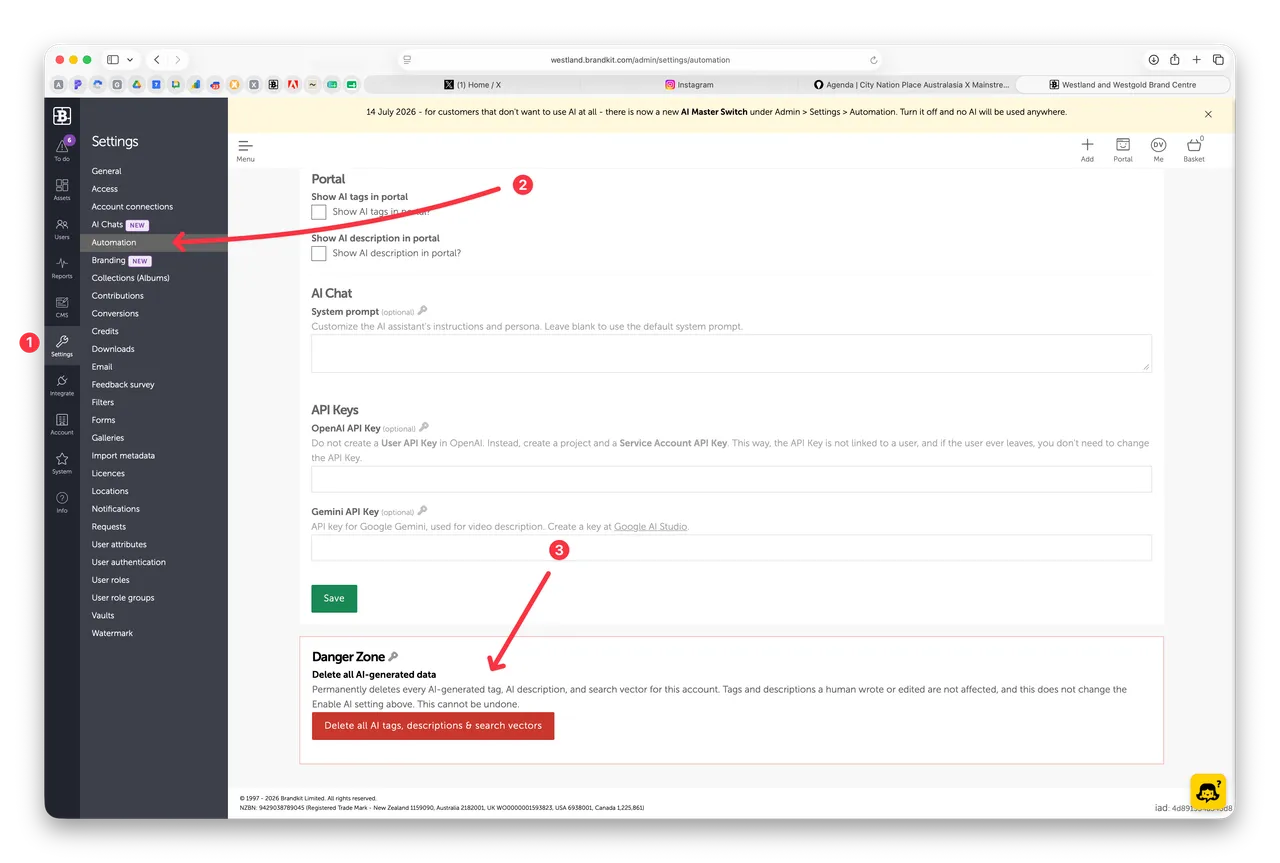
Note that this last step is NOT reversible. If you want to turn on AI again in the future, you will need to manually run auto tagging and auto descriptions and add search vectors for your assets again.
Happy branding :)
AI getting you down. Meet the new AI Master Switch
Brandkit now features an AI Master Switch to turn off all AI workflows (auto-tags, auto-descriptions, search vectors, semantic search). Learn why AI helps with metadata, when to disable it, and how to permanently delete AI-generated data if desired.